In an OSGi-based application, the business logic behind a controller is typically accessed through the OSGi Service Registry.
By default, Bundlor detects and exports all packages in a bundle. In this step Bundlor is told what to
export from the greenpages.app bundle and which types from those packages to use in the
greenpages.web bundle.
Add and save the following entry to the template.mf file in the
greenpages.app project and then run the MANIFEST.MF generation on the project as
explained in the section called “Creating web module metadata”.
Excluded-Exports: greenpages.internal
(As before, be careful not to leave trailing spaces on the ends of lines and not to add any blank lines to the file.)
Check that the package is no longer exported in the greenpages.app MANIFEST.MF file
which should look like this:
Manifest-Version: 1.0
Export-Package: greenpages;version="2.0"
Bundle-Vendor: SpringSource Inc.
Bundle-Version: 2.0
Tool: Bundlor 1.0.0.BUILD-20090616142719
Bundle-Name: GreenPages Service
Bundle-ManifestVersion: 2
Bundle-SymbolicName: greenpages
Import-Package: org.springframework.stereotype;version="[3.0, 3.1)"
Once Bundlor has done this, go to the next step.
Now that the greenpages.app bundle exports the package that the
Directory and Listing interfaces reside in,
the greenpages.web bundle must import it. In this step you will update the Maven
pom.xml file to depend on the greenpages.app bundle and import the
package.
Open the pom.xml file in the greenpages.web project. In this file add
the following entry (between the <dependencies> tags):
<dependency>
  <groupId>com.springsource.dmserver</groupId>
  <artifactId>greenpages.app</artifactId>
  <version>${project.version}</version>
</dependency>
This step should be sufficient for the Eclipse Maven plug-in to detect the dependencies between parts of the PAR project. Due to an error in the plug-in this fails. The following error may appear in the Maven console:
Missing artifact com.springsource.dmserver:greenpages.app:jar:2.0.0.SNAPSHOT:compile
Go to a shell or command window and issue the following command in the
start/greenpages.app directory:
mvn install
which will allow Eclipse to offer the correct imports for Listing and Directory
in what follows.
Open the GreenPagesController class and import the Listing and
Directory types. Eclipse should now offer these as a Quick Fix.
The class should now compile cleanly.
The following imports should now have been added to the GreenPagesController class:
import greenpages.Directory;
import greenpages.Listing;

import java.util.List;

import org.springframework.beans.factory.annotation.Autowired;
import org.springframework.stereotype.Controller;
import org.springframework.web.bind.annotation.RequestMapping;
import org.springframework.web.bind.annotation.RequestParam;
Add the following package clause to the Import-Template entry in the
template.mf file in the greenpages.web project. When added run the
MANIFEST.MF generation on the project as described in the section called “Creating web module metadata”.
greenpages.*;version="[2.0, 2.1)"
Be careful to include the “.*” in the package pattern.
Once Bundlor has finished, go to the next step.
If the GreenPages PAR is deployed now it fails because there is no bean of type Directory
to wire to the GreenPagesController field of that type.
To see this, and in particular where the problem is detected, the
greenpages.web bundle is undeployed and greenpages PAR is deployed.
Right-click on the dm Server in the Servers view, and select
Add and Remove Projects…. In the dialog that opens, remove the
greenpages.web bundle (if it is deployed) and add the greenpages PAR to the server. When
the configuration is complete, press Finish.
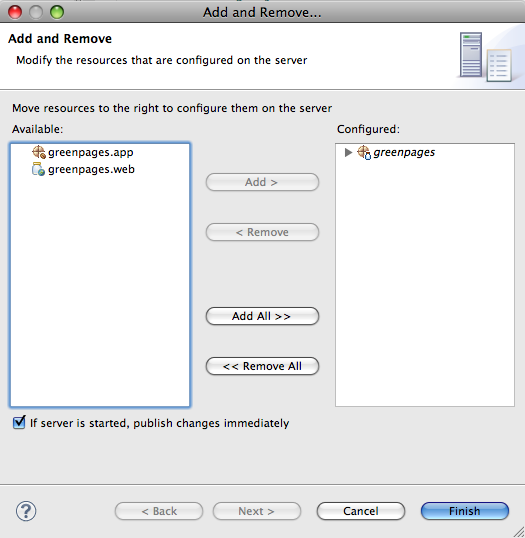
The PAR will deploy successfully. This is because the @Autowired field (which will fail) has not been resolved yet.
Navigate to http://localhost:8080/greenpages to see the failure.
At this time the beans in the web application are instantiated, and the failure of the Directory wiring is detected.
The browser will display a HTTP Status 500 - type: Exception report
with an exception that indicates the failure, for example:
org.springframework.beans.factory.BeanCreationException:
  Error creating bean with name 'greenPagesController': Autowiring of fields failed;
  nested exception is org.springframework.beans.factory.BeanCreationException:
    Could not autowire field: private greenpages.Directory greenpages.web.GreenPagesController.directory;
    nested exception is org.springframework.beans.factory.NoSuchBeanDefinitionException:
      No unique bean of type [greenpages.Directory] is defined:
      Unsatisfied dependency of type [interface greenpages.Directory]: expected at least 1 matching bean
This error is caused by there being no instance of Directory to inject into the controller, as predicted.
The next section will supply one.
Stop the server, or undeploy (Remove) the GreenPages PAR before proceeding.
There is no instance of Directory to be
injected into the controller. In the GreenPages application, it is intended that this
implementation is used through an interface in
the OSGi Service Registry. Using a service in the Service Registry enables
another bundle to
provide an implementation without revealing the implementation or the provider to all clients of the
service. dm Server supports the use of the Spring DM namespace for
referencing elements in the OSGi Service Registry.
This step adds an OSGi Service Reference to an implementation of the
Directory interface.
In the src/main/webapp/WEB-INF/applicationContext.xml file in the greenpages.web
project add a reference to a
greenpages.Directory instance in the OSGi service registry using
the <osgi:reference/> tag as follows:
<osgi:reference id="directory" interface="greenpages.Directory"/>