|
This version is still in development and is not considered stable yet. For the latest stable version, please use Spring Modulith 2.0.6! |
Production-ready Features
| If you are applying customizations to the application module detection described here, you need to move those into your production sources, unless already present there, to make sure that those are considered by the features described here. |
Spring Modulith provides support to expose architectural information about your system as a Spring Boot actuator endpoint as well as observing the interaction between application modules by capturing metrics and traces. As a production-ready application is likely to require both, the most convenient way to activate those features is to use the Spring Modulith Insight starter as follows:
-
Maven
-
Gradle
<dependency>
  <groupId>org.springframework.modulith</groupId>
  <artifactId>spring-modulith-starter-insight</artifactId>
  <version>2.1.0-RC1</version>
  <scope>runtime</scope>
</dependency>
dependencies {
runtimeOnly 'org.springframework.modulith:spring-modulith-starter-insight:2.1.0-RC1'
}This will include the actuator and observability support as well as Spring Boot’s actuator startup for general support for actuators. Note, that you will still have to add further dependencies to connect your application to your monitoring tools such as Zipkin, Wavefront etc. usually via OpenTelemetry or Brave. Find more information on that in the corresponding section of Spring Boot’s reference documentation.
Application Module Actuator
The application module structure can be exposed as Spring Boot actuator.
To enable the actuator, add the spring-modulith-actuator dependency to the project, unless you already declared the spring-modulith-starter-insight as described above:
-
Maven
-
Gradle
<dependency>
  <groupId>org.springframework.modulith</groupId>
  <artifactId>spring-modulith-actuator</artifactId>
  <version>2.1.0-RC1</version>
  <scope>runtime</scope>
</dependency>

<!-- Spring Boot actuator starter required to enable actuators in general -->
<dependency>
  <groupId>org.springframework.boot</groupId>
  <artifactId>spring-boot-starter-actuator</artifactId>
  <version>…</version>
  <scope>runtime</scope>
</dependency>
dependencies {
runtimeOnly 'org.springframework.modulith:spring-modulith-actuator:2.1.0-RC1'
}
<!-- Spring Boot actuator starter required to enable actuators in general -->
dependencies {
runtimeOnly 'org.springframework.boot:spring-boot-starter-actuator'
}Running the application will now expose an modulith actuator resource:
GET http://localhost:8080/actuator

{
  "_links": {
    "self": {
      "href": "http://localhost:8080/actuator",
      "templated": false
    },
    "health-path": {
      "href": "http://localhost:8080/actuator/health/{*path}",
      "templated": true
    },
    "health": {
      "href": "http://localhost:8080/actuator/health",
      "templated": false
    },
    "modulith": { (1)
      "href": "http://localhost:8080/actuator/modulith",
      "templated": false
    }
  }
}| 1 | The modulith actuator resource advertised. |
The modulith resource adheres to the following structure:
| JSONPath | Description |
|---|---|
|
The technical name of an application module. Target for module references in |
|
The human-readable name of the application module. |
|
The application module’s base package. |
|
(optional) The name of the parent module. See xref:fundamentals.adoc#modules.nested for details. |
|
The names of nested modules, if any. See xref:fundamentals.adoc#modules.nested for details. |
|
All outgoing dependencies of the application module |
|
The name of the application module depended on. A reference to a |
|
The types of dependencies towards the target module. Can either be |
An example module arrangement would look like this:
{
  "a": {
    "basePackage": "example.a",
    "displayName": "A",
    "dependencies": []
  },
  "b": {
    "basePackage": "example.b",
    "displayName": "B",
    "dependencies": [ {
      "target": "a",
      "types": [ "EVENT_LISTENER", "USES_COMPONENT" ]
    } ]
  }
}
Observing Application Modules
The interaction between application modules can be intercepted to create Micrometer spans to ultimately end up in traces you can visualize in tools like Zipkin or Grafana.
To activate the instrumentation add the following runtime dependency to your project, unless you already declared the spring-modulith-starter-insight as described above:
-
Maven
-
Gradle
<dependency>
  <groupId>org.springframework.modulith</groupId>
  <artifactId>spring-modulith-observability-core</artifactId>
  <version>2.1.0-RC1</version>
  <scope>runtime</scope>
</dependency>
dependencies {
runtimeOnly 'org.springframework.modulith:spring-modulith-observability-core:2.1.0-RC1'
}In case you would like to customize metrics created for application event publications, you will also need to declare the spring-modulith-observability-api artifact in compile scope.
| You will have to configure additional infrastructure dependencies depending on the tooling you want to pipe the observability metadata in. For details, please check the corresponding Spring Boot documentation on which dependencies to include for your setup. |
This will cause all Spring components that are part of the application module’s API being decorated with an aspect that will intercept invocations and create Micrometer spans for them. A sample invocation trace can be seen below:
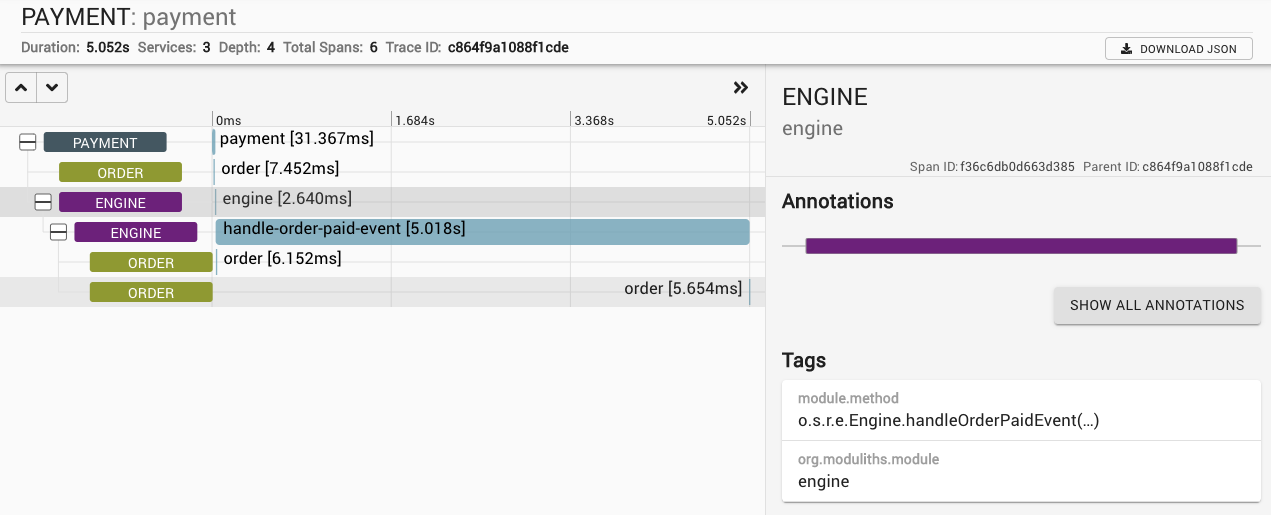
In this particular case, triggering the payment changes the state of the order which then causes an order completion event being triggered. This gets picked up asynchronously by the engine that triggers another state change on the order, works for a couple of seconds and triggers the final state change on the order in turn.
Observability Metrics
Spring Modulith registers data for all domain events published in the application in the form of two metrics.
-
module.events.published– a counter summarizing all event publications. -
module.events.published.$moduleIdentifier.$simpleEventTypeName- a counter for the individual event that can be further enriched with domain-specific values.
The All Events Metric
Name |
Description |
|
Type of the emitted event. |
|
The identifier of the module. |
|
Name of the module. |
The Individual Events Metric
Name |
Description |
|
The identifier of the module. |
|
Name of the module. |
Additional tags can be added to the invidual events metrics by implementing a ModulithEventMetricsCustomizer.
@Configuration
class ObservabilityConfiguration {

  @Bean
  ModulithEventMetricsCustomizer modulithEventMetricsCustomizer() {

    return metrics -> {

      metrics.customize(MyCustomDomainEvent.class, (event, it) -> {
        it.tags("someTag", event.getValue());
      });
    };
  }
}
Note how we are able to refer to the individual domain events by type and can translate values of the particular event into a value on the metric.
Conventions
The metrics created by Spring Modulith can be customized by providing a ModulithObservationConvention as bean in your application.
@Configuration
class ObservabilityConfiguration {

  @Bean
  ModulithObservationConvention observationConvention() {
    return new CustomModulithObservationConvention();
  }
}
Our default implementation delegates all calls to methods on ModulithContext.

