|
This version is still in development and is not considered stable yet. For the latest stable version, please use Spring AI 2.0.2! |
Structured Output
Large language models are text-in, text-out systems. The moment downstream code needs to route on a field, persist a value, or branch on a result, that text has to become a typed record. Structured output bridges that gap: the model is steered to produce text conforming to a schema, and the application parses it back into a typed object the rest of the codebase can treat like any other domain type.
Spring AI exposes structured output directly on the ChatClient fluent API through .entity(…).
You define a Java type for the shape you want back, and Spring AI takes care of the rest: a JSON schema is generated from your type, the model is instructed to honor it, and the response is deserialized into your type.
This page covers the high-level ChatClient path.
For reliability switches and lower-level APIs, see:
-
Schema Validation & Self-Correction — detect malformed output and retry automatically with
validateSchema(). -
Provider-Native Structured Output — enforce the schema at the provider API level with
useProviderStructuredOutput(). -
Output Converters — the lower-level
StructuredOutputConverterAPI, the built-in converters, and custom/non-JSON converters.
Typed Response
Define a Java record for the shape you want back:
record ActorsFilms(String actor, List<String> movies) {}Ask ChatClient to populate it.
Instead of finishing the call with .content() — which returns the raw text reply — finish with .entity(…) and pass your target type:
ActorsFilms films = chatClient.prompt()
    .user("Generate the filmography for a random actor.")
    .call()
    .entity(ActorsFilms.class);
The result is a typed ActorsFilms you can pass to the rest of your code:
films.actor();     // "Tom Hanks"
films.movies();    // ["Forrest Gump", "Cast Away", ...]
Behind the scenes, Spring AI did three things: a schema generator turned your ActorsFilms record into a JSON schema, that schema was appended to the prompt’s system context, and the model’s JSON answer was handed to a type converter that parsed it back into your record.
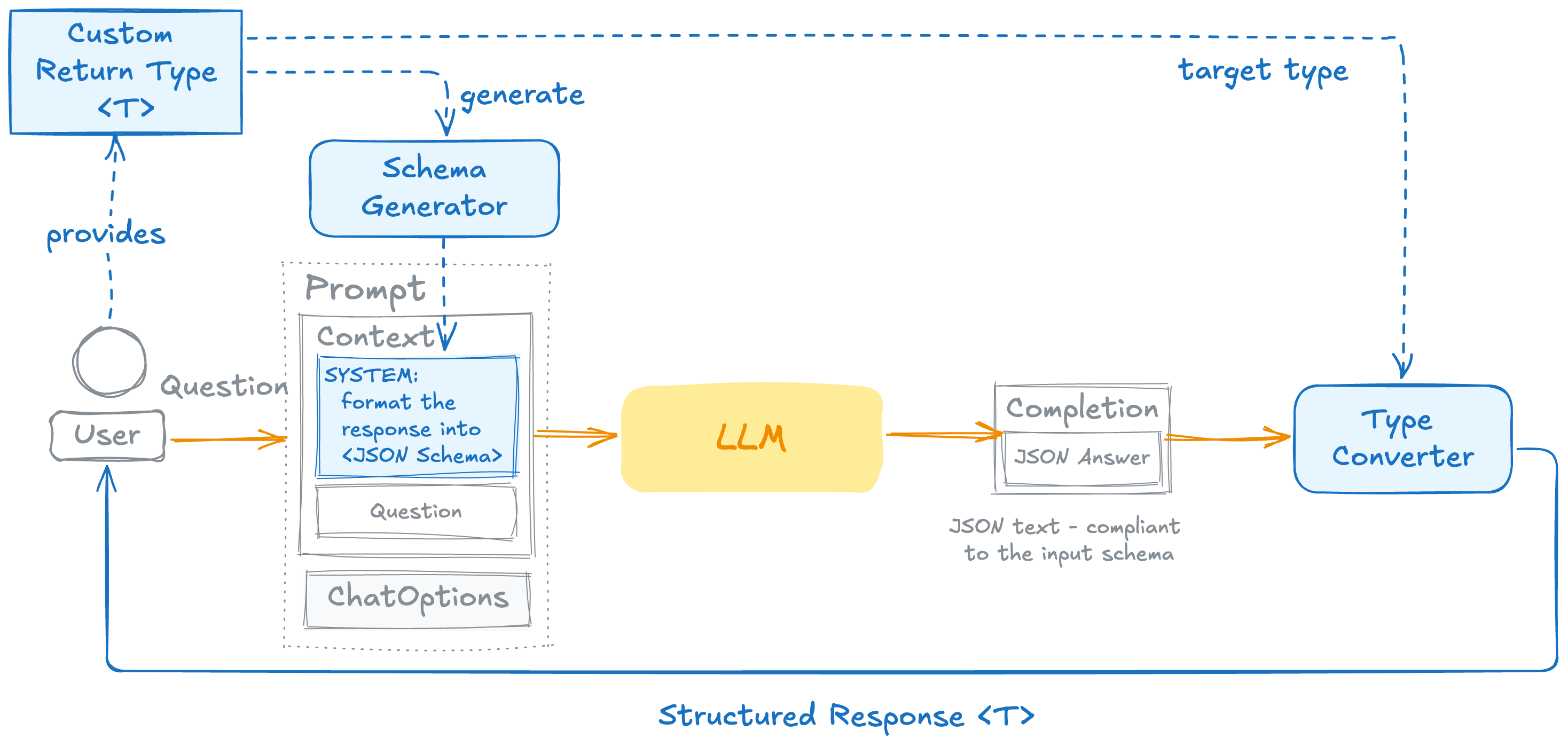
This works on every model Spring AI supports — there is nothing provider-specific about it.
|
|
The default .entity(…) call has no guarantees.
The model is asked to produce JSON matching the schema, not forced to.
Most of the time it complies; sometimes it returns an extra field, omits a required one, or wraps the JSON in prose, and the parser throws.
The two switches below address this.
Generic Types: Lists, Maps, and Beyond
.entity(Class) is for concrete classes.
For generic types — List<ActorsFilms>, Map<String, ActorsFilms> — use ParameterizedTypeReference:
List<ActorsFilms> films = chatClient.prompt()
    .user("Generate filmographies for three random actors.")
    .call()
    .entity(new ParameterizedTypeReference<List<ActorsFilms>>() {});
Reliability Switches: EntityParamSpec
All .entity(…) (and .responseEntity(…)) overloads accept an optional Consumer<EntityParamSpec> that enables two independent, composable behaviors.
Don’t Fail on Malformed Output: validateSchema()
validateSchema() turns on a self-correcting retry loop: Spring AI validates the response against the entity’s schema, and if validation fails, the specific error is appended to the prompt and the call is re-issued — up to 3 attempts by default.
ActorsFilms films = chatClient.prompt()
    .user("Generate the filmography for a random actor.")
    .call()
    .entity(ActorsFilms.class, spec -> spec.validateSchema());
See Schema Validation & Self-Correction for how the retry loop works and how to customize it.
Stronger Upstream Guarantees: useProviderStructuredOutput()
useProviderStructuredOutput() sends the schema to the provider as an API-level constraint, so the provider’s runtime enforces conformance rather than relying on prompt instructions.
ActorsFilms films = chatClient.prompt()
    .user("Generate the filmography for a random actor.")
    .call()
    .entity(ActorsFilms.class, spec -> spec.useProviderStructuredOutput());
This requires the underlying model to support native structured output. See Provider-Native Structured Output for supported providers and limitations.
Combining Both
The two switches solve different problems and compose naturally:
ActorsFilms films = chatClient.prompt()
    .user("Generate the filmography for a random actor.")
    .call()
    .entity(ActorsFilms.class, spec -> spec
        .useProviderStructuredOutput()
        .validateSchema());
useProviderStructuredOutput() minimizes the chance of malformed output by constraining the model at the API level.
validateSchema() catches the residual cases — provider edge cases, reasoning-model quirks — and corrects them automatically.
Reach for both when downstream code cannot tolerate shape drift.
Getting the Full Response
.entity(…) returns only the parsed object.
If you also need the underlying ChatResponse — for token usage, observability metadata, or anything beyond the entity — use .responseEntity(…):
ResponseEntity<ChatResponse, ActorsFilms> result = chatClient.prompt()
    .user("Generate the filmography for a random actor.")
    .call()
    .responseEntity(ActorsFilms.class);

ActorsFilms films = result.entity();
ChatResponse raw = result.response();
long totalTokens = raw.getMetadata().getUsage().getTotalTokens();
It has the same overload set as .entity(…) — Class, ParameterizedTypeReference, custom StructuredOutputConverter, and the EntityParamSpec consumer all apply.
Custom and Non-JSON Output
When the built-in JSON parsing is not enough — the model wraps JSON in markdown fences, or you need a non-JSON format such as YAML or CSV — pass your own StructuredOutputConverter<T> to .entity(…).
See Output Converters.
Cheat Sheet
| You need | Use |
|---|---|
Default — works on every provider |
|
Generic types like |
|
Don’t fail on malformed output |
|
Stronger upstream guarantees from the provider |
|
Both — request constraint + response retry |
|
Token usage / metadata alongside the entity |
|
Model wraps JSON in markdown fences, or non-JSON format |
Implement |
Streaming responses |
Not supported — |
Structured output is a best effort to convert the model output into a structured type.
The model is not guaranteed to return the requested structure.
Use validateSchema() and/or useProviderStructuredOutput() when correctness matters.
|
The StructuredOutputConverter is not used for LLM Tool Calling, as this feature inherently provides structured outputs by default.
|

