|
This version is still in development and is not considered stable yet. For the latest snapshot version, please use Spring AI 1.1.5! |
Dynamic Tool Discovery with Tool Search Tool
As AI agents connect to more services—Slack, GitHub, Jira, MCP servers—tool libraries grow rapidly. A typical multi-server setup can easily have 50+ tools consuming significant tokens before any conversation starts. Worse, tool selection accuracy degrades when models face 30+ similarly-named tools.
The Tool Search Tool pattern, pioneered by Anthropic, addresses this: instead of loading all tool definitions upfront, the model discovers tools on-demand. It receives only a search tool initially, queries for capabilities when needed, and gets relevant tool definitions expanded into context.
Spring AI’s implementation achieves 34-64% token reduction across OpenAI, Anthropic, and Gemini models while maintaining full access to hundreds of tools.
Introduction
The Tool Search Tool project extends Spring AI’s Recursive Advisors to implement dynamic tool discovery that works across any LLM provider supported by Spring AI.
Key benefits:
-
Token savings - Only discovered tool definitions are sent to the LLM
-
Improved accuracy - Models select tools more reliably from smaller, relevant sets
-
Scalability - Manage hundreds of tools without context bloat
-
Portability - Works with OpenAI, Anthropic, Gemini, Ollama and more
Blog Post
📖 Full Tutorial: Smart Tool Selection: Achieving 34-64% Token Savings with Spring AI’s Dynamic Tool Discovery
The blog post covers the complete implementation details, performance benchmarks, and advanced use cases.
Quick Start
Dependencies
Add the Tool Search Tool dependency to your project:
-
Maven
-
Gradle
<dependency>
    <groupId>org.springaicommunity</groupId>
    <artifactId>tool-search-tool</artifactId>
    <version>2.0.0</version>
</dependency>

<!-- Choose a search strategy -->
<dependency>
    <groupId>org.springaicommunity</groupId>
    <artifactId>tool-searcher-lucene</artifactId>
    <version>2.0.0</version>
</dependency>
dependencies {
implementation 'org.springaicommunity:tool-search-tool:2.0.0'
// Choose a search strategy
implementation 'org.springaicommunity:tool-searcher-lucene:2.0.0'
}Basic Usage
@SpringBootApplication
public class Application {

    @Bean
    CommandLineRunner demo(ChatClient.Builder builder, ToolSearcher toolSearcher) {
        return args -> {
            var advisor = ToolSearchToolCallAdvisor.builder()
                .toolSearcher(toolSearcher)
                .build();

            ChatClient chatClient = builder
                .defaultTools(new MyTools())  // 100s of tools registered but NOT sent to LLM initially
                .defaultAdvisors(advisor)     // Activate Tool Search Tool
                .build();

            var answer = chatClient.prompt("""
                Help me plan what to wear today in Amsterdam.
                Please suggest clothing shops that are open right now.
                """).call().content();

            System.out.println(answer);
        };
    }

    static class MyTools {
        @Tool(description = "Get the weather for a given location at a given time")
        public String weather(String location,
            @ToolParam(description = "YYYY-MM-DDTHH:mm") String atTime) {
            // implementation
        }

        @Tool(description = "Get clothing shop names for a given location at a given time")
        public List<String> clothing(String location,
                @ToolParam(description = "YYYY-MM-DDTHH:mm") String openAtTime) {
            // implementation
        }

        @Tool(description = "Current date and time for a given location")
        public String currentTime(String location) {
            // implementation
        }

        // ... potentially hundreds more tools
    }
}
How It Works
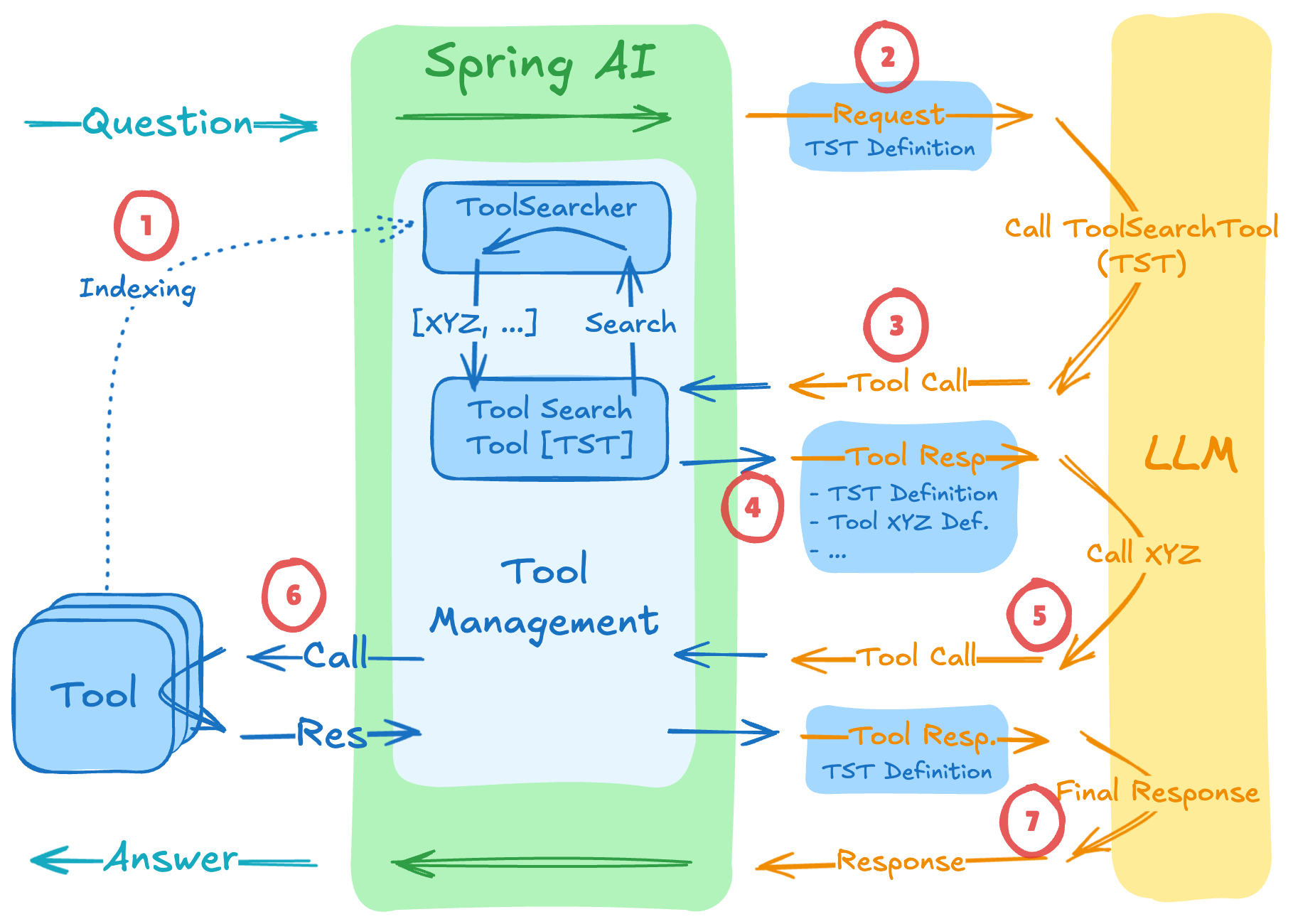
The ToolSearchToolCallAdvisor extends Spring AI’s ToolCallAdvisor to implement dynamic tool discovery:
-
Indexing: At conversation start, all registered tools are indexed in the
ToolSearcher(but NOT sent to the LLM) -
Initial Request: Only the Tool Search Tool definition is sent to the LLM
-
Discovery Call: When the LLM needs capabilities, it calls the search tool with a query
-
Search & Expand: The
ToolSearcherfinds matching tools and their definitions are added to the next request -
Tool Invocation: The LLM now sees both the search tool and discovered tool definitions
-
Tool Execution: Discovered tools are executed and results returned
-
Response: The LLM generates the final answer
Search Strategies
The ToolSearcher interface supports multiple search implementations:
| Strategy | Implementation | Best For |
|---|---|---|
Semantic |
|
Natural language queries, fuzzy matching |
Keyword |
|
Exact term matching, known tool names |
Regex |
|
Tool name patterns ( |
See tool-searchers for all available implementations.
Performance
Preliminary benchmarks with 28 tools show significant token savings:
| Model | With Tool Search | Without | Savings |
|---|---|---|---|
Gemini |
2,165 tokens |
5,375 tokens |
60% |
OpenAI |
4,706 tokens |
7,175 tokens |
34% |
Anthropic |
6,273 tokens |
17,342 tokens |
64% |
When to Use
| Tool Search Tool Approach | Traditional Approach |
|---|---|
20+ tools in your system |
Small tool library (<20 tools) |
Tool definitions consuming >5K tokens |
All tools frequently used in every session |
Building MCP-powered systems with multiple servers |
Very compact tool definitions |
Experiencing tool selection accuracy issues |
Example Projects
-
Tool Search Tool Demo - Complete working example
-
Pre-Select Tool Demo - Deterministic tool selection without LLM involvement
Community Resources
-
Awesome Spring AI - Community examples and resources
References
-
Anthropic Advanced Tool Use - Original pattern description
-
Spring AI Recursive Advisors Blog - Foundation for tool search implementation

