|
This version is still in development and is not considered stable yet. For the latest stable version, please use Spring AI 2.0.1! |
Compaction
As a conversation grows it exceeds the model’s context window. Compaction reduces the active view to fit while keeping the conversation coherent. Two abstractions drive it: a trigger says when, a strategy says what leaves the view.
Entry point
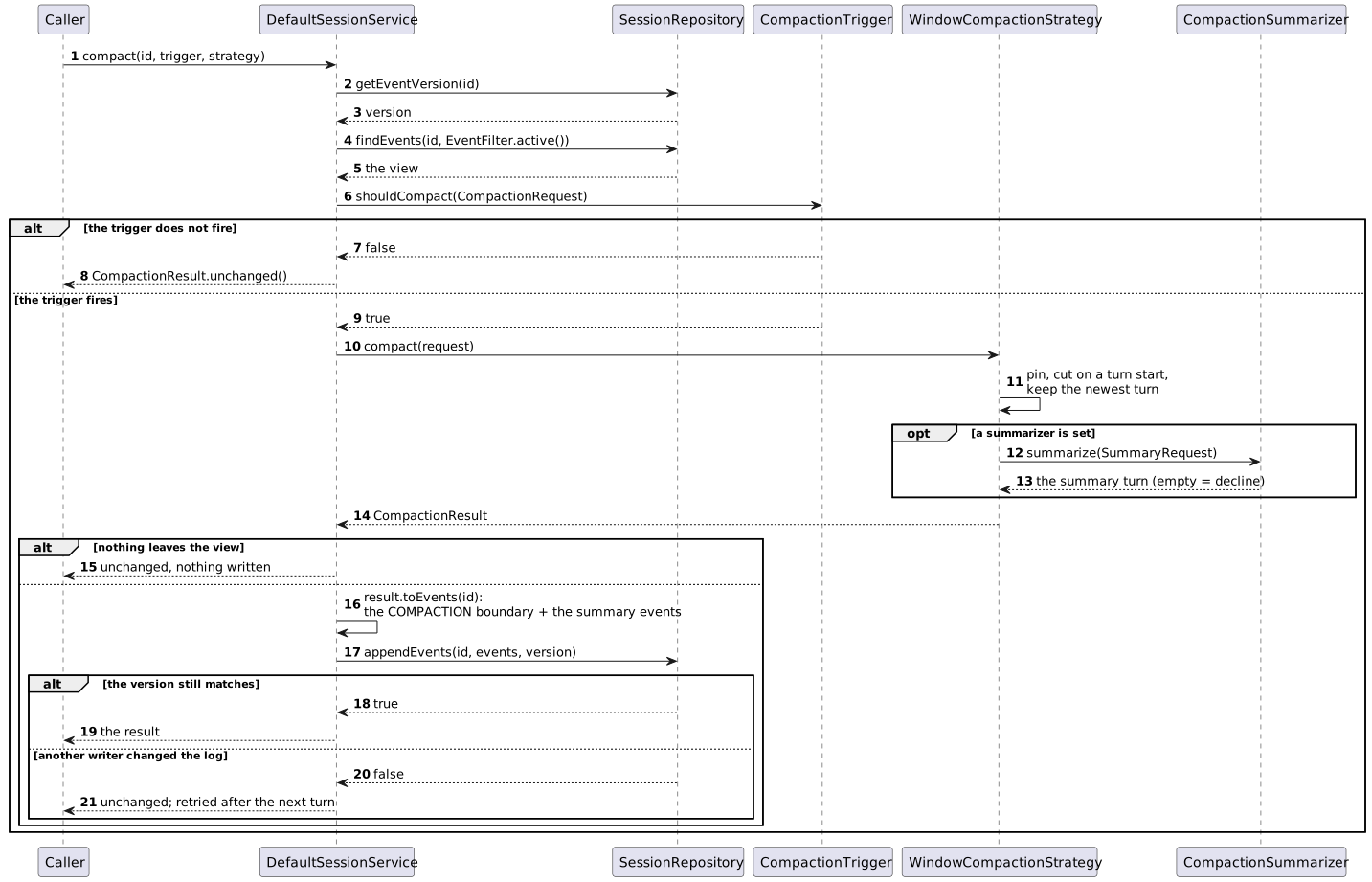
SessionService.compact(id, trigger, strategy) evaluates the trigger on the active view and runs the strategy only when it fires.
The strategy’s result is recorded as one COMPACTION boundary event followed by the summary events, in one version-checked append; when nothing should leave the view, nothing is written.
The log is never modified: the boundary names the events that make up the view from then on.
CompactionResult result = sessionService.compact(sessionId,
        new TurnCountTrigger(20),
        WindowCompactionStrategy.builder().lastTurns(10).build());

result.isUnchanged();           // nothing left the view, nothing was written
result.coveredEvents();         // the events that left the view; they stay in the log
result.pinnedEvents();          // kept first in the view: the system prompt, a preamble, a prior summary
result.preservedEvents();       // the recent events kept verbatim
result.summary();               // the summary turn, as messages; empty for a plain window
result.tokensEstimatedSaved();  // an estimate, net of the summary

// Compact unconditionally
sessionService.compact(sessionId, request -> true, strategy);
With ChatClient, the SessionTurnAdvisor calls compact once the call has returned, so an application rarely calls it itself.
Triggers
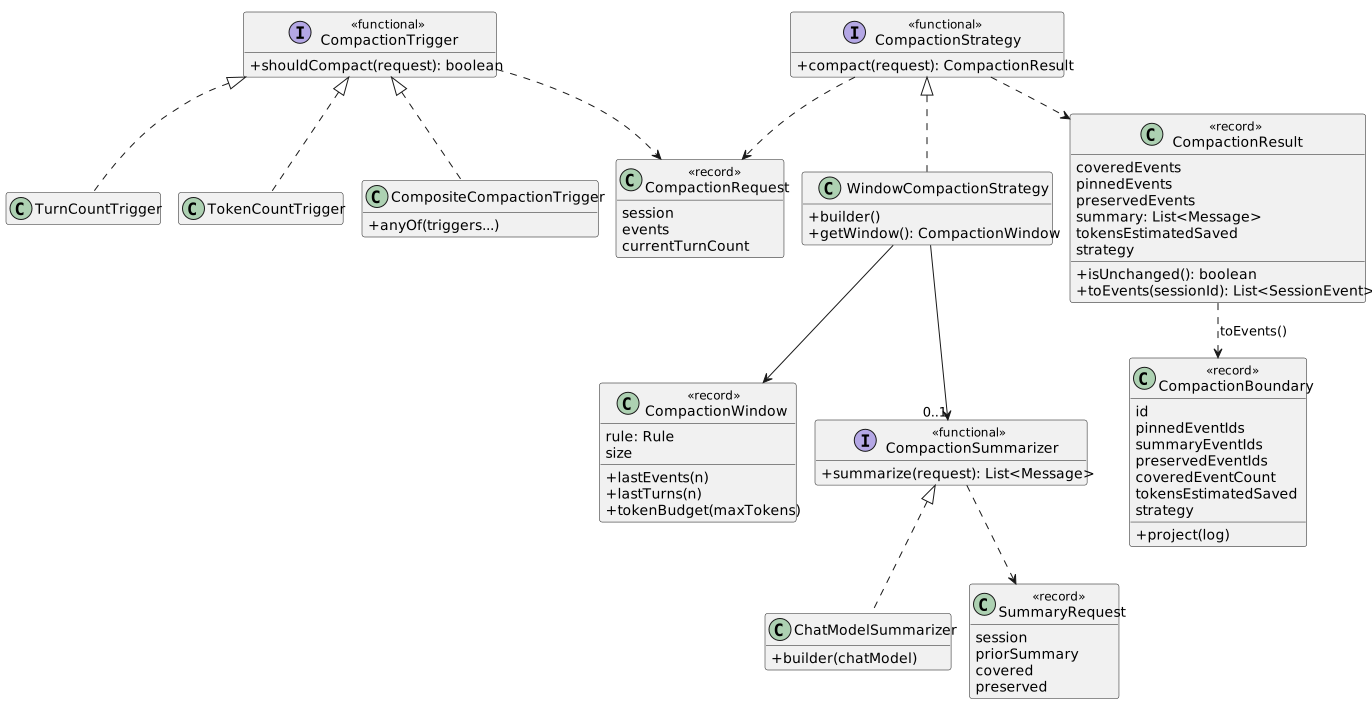
A CompactionTrigger is a functional interface that decides on a CompactionRequest: the session, its active view and the view’s turn count.
// More than 20 turns in the view: the non-synthetic user messages are counted
new TurnCountTrigger(20);

// The view's estimated tokens reach 4000
TokenCountTrigger.builder().threshold(4000).build();
TokenCountTrigger.builder().threshold(4000).tokenCountEstimator(myEstimator).build();

// Any of several
CompositeCompactionTrigger.anyOf(new TurnCountTrigger(20), TokenCountTrigger.builder().threshold(4000).build());
TokenCountTrigger counts what is sent to the model, the latest stored system message, the summaries and the conversation, with a TokenCountEstimator (JTokkit by default), the same measure a token budget uses, so a threshold and a budget are expressed in the same units.
The window strategy
WindowCompactionStrategy keeps the recent conversation in the view and covers the rest.
A CompactionWindow says how much stays: the last events, the last turns, or what fits a token budget.
WindowCompactionStrategy.builder().lastEvents(20).build();     // the default window: the last 20 events
WindowCompactionStrategy.builder().lastTurns(10).build();      // the last 10 turns
WindowCompactionStrategy.builder().tokenBudget(4000).build();  // what fits in 4000 estimated tokens

WindowCompactionStrategy.builder()
    .window(CompactionWindow.lastTurns(10))
    .tokenCountEstimator(myEstimator)                           // for a token budget and the saved estimate
.build();| Window | Keeps | Best for |
|---|---|---|
|
The last |
A predictable, cost-free window |
|
The last |
Turn-structured dialogues |
|
The newest events whose estimated tokens fit the budget, as a contiguous suffix, after the pinned events' tokens came off it |
A hard context window limit |
One pass
Whatever the window, a pass does the same thing:

-
The latest stored system message is pinned at the front of the view and never summarized. Every earlier stored system message is superseded and leaves the view with a pass that cuts, wherever it sits, even inside the kept window.
-
The events before the first turn, a pre-seeded preamble, are pinned too.
-
Without a summarizer, the summary a previous pass left is pinned and carried forward; with one, it is handed to the summarizer as the prior summary and covered by the new summary.
-
The window gives the raw cut among the turns. The cut moves forward to the next turn start, so a turn is never split, and back to the newest turn when it would cover everything, so the newest turn stays even when it alone exceeds the window.
-
The turns before the cut leave the view (covered), the rest stay (preserved).
Pinned events use no slot of an event or turn window and come off a token budget first. Size a token budget so that the pinned events leave room for the conversation, or keep the system prompt out of the session.
Two guarantees follow, whatever the window:
-
The kept window starts at a turn. A tool result or an assistant reply is never kept without the user message that started its turn.
-
The newest turn is always kept. When it alone exceeds the window, a long tool-calling loop for example, it stays anyway, so a compaction never covers the turn in progress. When there is no turn to cut at, nothing is covered and no summarizer is called.
Window of 3 events   [u1, a1, u2, a2a, | a2b, u3, a3]   the raw cut lands inside turn 2
Kept                 [u1, a1, u2, a2a, a2b, | u3, a3]   moved to the next turn start
The tricky cases
S is a stored system message, U and A are user and assistant messages, Σ a summary turn.
| Case | View before | Window | View after | Covered |
|---|---|---|---|---|
Cut lands mid-turn |
|
|
|
|
Newest turn alone is over the window |
|
|
|
|
The whole history is one oversize turn |
|
|
unchanged |
nothing |
System message updated mid-session, no cut needed |
|
|
unchanged |
nothing |
System prompt stored in an old turn |
|
|
|
|
Token budget with a system prompt (11 tokens, turns of 21) |
|
|
|
the older turn |
A summarizer with a prior summary |
|
|
|
|
In the fourth case S:v1 stays in the view until a cut covers it; the advisor uses only the latest stored system message anyway.
In the sixth, the system prompt’s tokens come off the budget first, leaving 34, so only the newest turn fits; without it both turns (42) would.
Summarizing what leaves the view
A CompactionSummarizer condenses the covered turns into a summary turn that stands in for them: a user "shadow prompt" and an assistant summary, so the model keeps seeing a user/assistant alternation.
It is a functional interface that receives a SummaryRequest, the session, the prior summary to build on, the covered events and the preserved ones for continuity, and returns the messages of the summary turn.
A summarizer that returns no messages declines: the view stays as it is and nothing is written, so a failed model call never loses history.
ChatModelSummarizer asks a ChatModel for a rolling summary, with ChatOptions of its own if a smaller model should do it.
The prior summary is fed back as context, so each summary builds on its predecessors, and the first overlapSize preserved events are quoted for continuity; stored system messages are never included.
CompactionStrategy strategy = WindowCompactionStrategy.builder()
    .lastTurns(10)
    .summarizer(ChatModelSummarizer.builder(chatModel)
        .chatOptions(ChatOptions.builder().model("small-model").build())  // optional: the summarizing call's options
        .overlapSize(2)                             // preserved events quoted for continuity; 2 by default
        .systemPrompt("...")                        // optional: the summarizing call's system prompt
        .shadowPrompt("Fasse unser Gespräch zusammen.")  // optional: the user message that opens the summary turn
        .eventFormatter(event -> ...)               // optional: how an event is rendered in the prompt
        .onSummarizationFailure(request -> ...)     // optional: called on a failed call or a blank reply
        .build())
    .build();
The summarizing call goes to the ChatModel directly: no advisor sees it, and it is never stored as conversation.
A failed model call or a null or blank reply is logged at WARN, the failure callback is called, and the view is unchanged.
An exception from the model call propagates out of SessionService.compact; the SessionTurnAdvisor catches and logs it, so the user’s call still succeeds.
EventText.of(event) is the one-line rendering of an event that the token estimates and the default prompt use: User: …, Assistant: …, Assistant [tool calls: name(args)], Tool [responses: name → data].
Tool calls and tool results therefore count their full rendering, not their getText(), which is null for both.
How a pass is recorded
A strategy answers one question: what should the view look like now?
The store is asked another: what do I write?
The answer has one shape, whatever the strategy: one COMPACTION event whose payload is a CompactionBoundary, followed by one synthetic MESSAGE event per summary message, appended with appendEvents(sessionId, events, expectedVersion).
-
The view is named by id, not by position. The boundary lists the ids of the pinned, summary and preserved events, in view order; a pinned system message stored before the first boundary is named again by every later one.
-
What is not named is covered. The covered events are not listed;
coveredEventCountandtokensEstimatedSavedare kept for reporting. -
The view is projected on every read.
CompactionBoundary.project(log)resolves the ids of the newest boundary against the log, then appends every event after the boundary. Neither the boundary itself nor an older boundary is in the view.
log before      U1 A1 ⊥1 Σold U2 A2 U3 A3
view before     Σold U2 A2 U3 A3                 (⊥1 names Σold; U2 A2 U3 A3 follow it)

a summarizing pass with lastEvents(2):
  covered   = [Σold U2 A2]      pinned = []      preserved = [U3 A3]      summary = [Σnew]

appended        ⊥2 {summary: [Σnew], preserved: [U3, A3]}   Σnew

log after       U1 A1 ⊥1 Σold U2 A2 U3 A3 ⊥2 Σnew
view after      Σnew U3 A3
Every existing event keeps its position and its content.
Σold stays in the log, so it still shows what the model was told before this pass.
The new summary is placed in front of U3 by the projection, not by the write: the write is a plain append, which keeps it cheap and keeps the log a faithful record.

