|
This version is still in development and is not considered stable yet. For the latest stable version, please use Spring AI 2.0.2! |
Decision Models
Many decisions in an application have a small, known set of possible results: yes or no, one of a few categories, or a level on a scale. You could ask a chat model, but it answers with free text, and you must turn that text into a reliable yes or no yourself. A decision model is made for these decisions. You describe the possible results, and the model picks one and tells you how likely each result is.
This makes decision models a good fit for classification, such as sorting customer messages by topic and sending each one to the right team. They also work well as guardrails, for example, to stop a prompt injection before it reaches a chat model, or to find a chat answer that the retrieved documents don’t support. They also help with everyday business logic, such as finding out whether a customer reports a broken product, or how satisfied the customer is.
A decision model is usually faster and cheaper than a chat model that you ask the same thing. It reports how likely each result is, so your application decides how sure the model must be before it acts on the answer.
A decision model is still a machine learning model, not a rule engine: its answers are not deterministic, and they can be wrong. For each decision, think about what happens when the answer is wrong. When a mistake is expensive, let a person check the answer or use a safe default.
Quick Start
Pick one of the available implementations and add its Spring Boot starter. The quickest way to try decision models is Ollama. It runs on your machine and needs no API key. Install Ollama 0.40.4 or later, start it, and add the Spring AI Ollama starter to your project:
-
Maven
-
Gradle
<dependency>
    <groupId>org.springframework.ai</groupId>
    <artifactId>spring-ai-starter-model-ollama</artifactId>
</dependency>
dependencies {
implementation 'org.springframework.ai:spring-ai-starter-model-ollama'
}| Refer to the Dependency Management section to add the Spring AI BOM to your build file. |
Then pull d1-omni:600m, the default decision model of the Ollama integration:
ollama pull d1-omni:600mSpring AI can also pull the model for you at startup, with spring.ai.ollama.init.pull-model-strategy=when_missing.
See Auto-pulling Models for the details.
The starter creates a DecisionModel bean.
Inject it, and ask it questions:
@Service
class SupportTriage {

    private final DecisionModel decisionModel;

    SupportTriage(DecisionModel decisionModel) {
        this.decisionModel = decisionModel;
    }

    void triage() {
        DecisionResponse response = decisionModel.call(DecisionPrompt.builder()
            .text("My new headphones arrived yesterday, but the left side doesn't work. Can I get my money back?")
            .question("defect", YesNoQuestion.builder()
                .text("Does the customer report a defect?")
                .whenYes("Part of the item does not work as it should")
                .whenNo("The item works, and the message is about something else")
                .build())
            .question("topic", ChoiceQuestion.builder()
                .text("What is the message about?")
                .option("delivery", "Where an order is, or when it will arrive")
                .option("product", "A problem with an item the customer received")
                .option("account", "Login, address or payment details")
                .option("other", "None of the above")
                .build())
            .question("satisfaction", ScoreQuestion.of("How satisfied is the customer?", "unhappy", "neutral", "happy"))
            .build());

        boolean defect = response.getYesNo("defect").isYes();
        String topic = response.getChoice("topic").getValue();
        int satisfaction = response.getScore("satisfaction").getNearestLevel();
    }

}
The prompt asks three named questions about the customer message, one of each kind. The response has one answer for each question. The rest of this page explains each part, and the provider pages use the same example.
Asking Questions
A DecisionPrompt holds the input, the questions to ask about it and, optionally, the settings of the call.
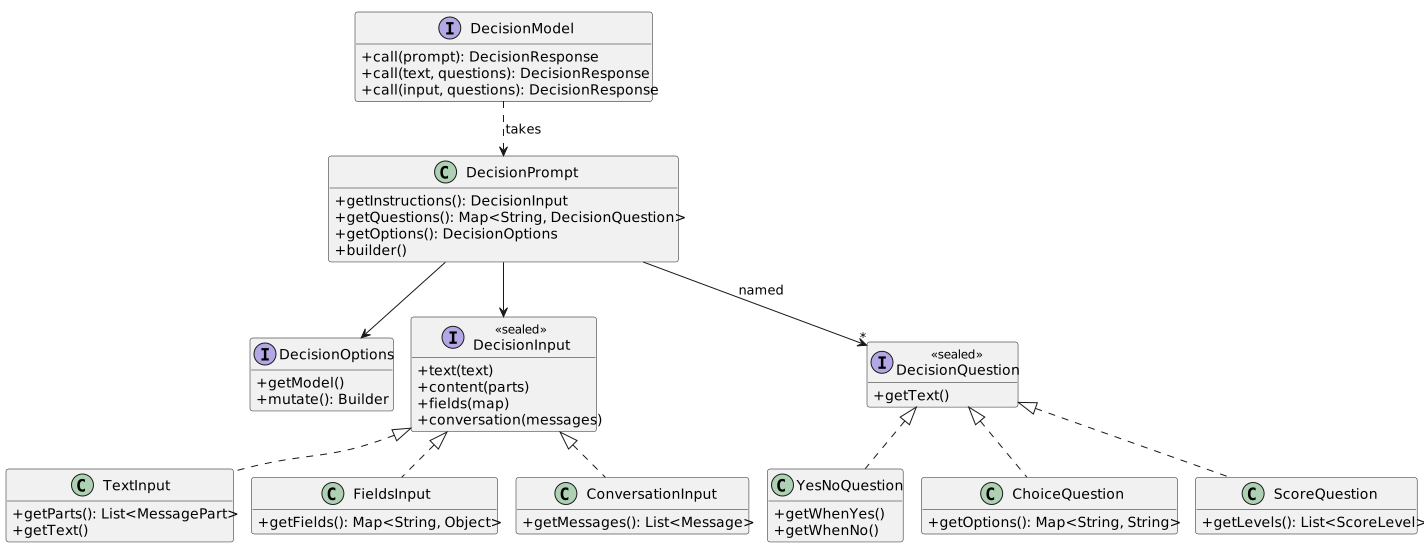
When you have only a text and one or two questions, call(String, Map) is shorter, because you don’t need to build a prompt:
DecisionResponse response = decisionModel.call("Where is my order? I ordered it two weeks ago.",
        Map.of("topic", ChoiceQuestion.of("What is the message about?",
                "delivery", "product", "account", "other")));
Questions
There are three kinds of questions, and every provider supports all three.
| Question | What it asks | Answer |
|---|---|---|
|
Whether something is true.
Optional |
|
|
Which of the offered options fits the input. Each option has a name and, optionally, a description. |
|
|
Which level of an ordered scale fits the input, such as |
|
DecisionQuestion and DecisionAnswer are sealed interfaces.
A switch over a question or an answer can cover every kind, and the compiler checks that none is missing.
These tips help you get more reliable answers:
-
Pick the kind of question from what your code does next. Use a
YesNoQuestionwhen the code takes one of two paths, aChoiceQuestionwhen it takes one of several, and aScoreQuestionwhen it needs a level, such as a priority. -
Add descriptions when a name alone can be read in more than one way. In the example, the
productoption alone could mean any question about a product, so its description says that it is about a problem with an item the customer received. ThewhenYesandwhenNocriteria do the same for a yes/no question. -
Send only what the decision needs. A short message, or a few relevant fields, gives clearer answers than a whole customer record or a long conversation.
-
Try your questions on real inputs before you rely on them, including inputs that are hard to decide. If the probabilities stay close to
0.5, or are spread over several options, change the wording and try again.
The answers come back in the same order as the questions.
Map.of(…) has no order, so when the order is important to you, add the questions one by one to the builder, or use a LinkedHashMap.
Inputs
The input is what the questions are about.
DecisionInput offers three kinds of input, and the DecisionPrompt builder has a method for each of them.
| Input | Use it for |
|---|---|
|
A plain text, such as a customer message.
For a text with images, use |
|
An input made of named fields, such as a customer message together with numbers about the customer’s orders.
The model gets each value with its name, so it knows what each value means.
Values can be strings, numbers, booleans, nulls, maps, and lists.
A top-level field can also hold content parts, such as an image.
Use a |
|
A conversation, made of the same |
For any kind of input, call(DecisionInput, Map) works like call(String, Map):
Map<String, Object> customer = new LinkedHashMap<>();
customer.put("message", "This is the third time my order arrives late.");
customer.put("orders", 12);
customer.put("late_deliveries", 3);

DecisionResponse repeated = decisionModel.call(DecisionInput.fields(customer),
        Map.of("repeated", YesNoQuestion.of("Does the customer say that the problem happened before?")));

// expected: no, because the assistant talks about the delivery date, not about returns
DecisionResponse answered = decisionModel.call(
        DecisionInput.conversation(List.of(
            new UserMessage("Can I return the headphones?"),
            new AssistantMessage("Your order will arrive on Friday."))),
        Map.of("answered", YesNoQuestion.of("Does the last assistant message answer the user's question?")));
Not every provider supports every kind of input or content part, such as images. See the provider pages for details.
Options
DecisionOptions holds the settings of a call, such as the model to use.
Set it on the prompt to change the model’s default settings for one call.
For example, with Ollama you can use a larger model for one call:
DecisionPrompt prompt = DecisionPrompt.builder()
    .text("Where is my order? I ordered it two weeks ago.")
    .question("topic", ChoiceQuestion.of("What is the message about?",
            "delivery", "product", "account", "other"))
    .options(DecisionOptions.builder().model("d1-omni:2b").build())
    .build();
Options are immutable.
mutate() returns a builder that starts from their values, and combineWith(…) sets on a builder the values that another builder sets.
This is how a model combines its default settings with the settings of the prompt: the settings of the prompt change only what they set, and the model’s default settings apply to the rest.
Each provider has its own options class with more settings, described on its page.
Reading Answers
A DecisionResponse holds one answer for each question, and the metadata of the call.

Get the answer to a question by its name, with the method for its kind: getYesNo(name), getChoice(name) or getScore(name).
getAnswer(name, Class) does the same for any kind of answer.
hasAnswer(name) tells whether the response has an answer to a question, including a refusal.
Yes/No Answers
A YesNoAnswer has the probability of yes, as getProbability().
isYes() answers yes when that probability is at least 0.5.
With isYes(double), you choose the threshold:
// open a repair ticket automatically only when the model is very sure
boolean defect = response.getYesNo("defect").isYes(0.9);
Choice Answers
A ChoiceAnswer has the selected option, as getValue().
When the provider reports them, it also has the probability of each option:
-
getProbability()for the selected option; -
getProbability(option)for any option; -
getRankedOptions()for all the options, from the most to the least likely.
If the selected option is only a little more likely than the second one, the message is not clear. In that case, a person may handle it better.
Score Answers
A ScoreAnswer has three ways to read the result:
-
getNearestLevel(): the position of the most likely level, starting at0. Use this one to act on. If two levels are equally likely, it returns the one closer to the expected level. -
getValue(): the expected level, that is, the average level weighted by the probabilities. It is a decimal number between0and the number of levels minus one. For example,1.5means that the model is split between the second and the third level. -
getRoundedLevel(): the expected level, rounded to the nearest level.
When the provider reports them, getProbabilities() also has the probability of each level.
Without them, or when none of them is above zero, getNearestLevel() returns the same level as getRoundedLevel().
The expected level can be a level that the model thinks is unlikely:
// probabilities 0.5, 0, 0.5 over the levels unhappy, neutral, happy
ScoreAnswer satisfaction = response.getScore("satisfaction");
satisfaction.getNearestLevel();  // 0, unhappy: as likely as happy and as close to 1.0, so the first one wins
satisfaction.getValue();         // 1.0, the average level weighted by the probabilities
satisfaction.getRoundedLevel();  // 1, neutral, which has no probability at all
Probabilities and Confidence
The probabilities are the values that the model gives to each possible result. They don’t guarantee that the answer is correct. You also can’t compare them across models, or across questions with different wording. Choose your thresholds by testing the model on real examples from your application, and test them again when you change the model.
ChoiceAnswer and ScoreAnswer also have getConfidence().
It is the provider’s own estimate, between 0 and 1, of how sure it is about the whole answer.
It is null when the provider doesn’t report it.
Refusals
A provider can refuse to answer one question, and still answer the others.
That question gets a RefusalAnswer, and response.isRefused(name) returns true for it.
The methods for each kind, such as getYesNo(name), throw an IllegalStateException for a refused question.
A refusal doesn’t make the call fail.
Available Implementations
-
System One Decision Models, for TypeSafe Jev, Laya, llmman, and Ollama
Observability
Spring AI observes decision model calls in the same way as the calls of other models.
It uses the gen_ai.client.operation observation, with the decision operation name.
See Decision Model observability.
Usage in Spring AI
Other Spring AI features use decision models too.
-
In RAG pipelines, the
DecisionDocumentRerankersorts the retrieved documents by asking whether each one answers the query. TheDecisionDocumentFilterchecks them for prompt injection, contradictions, and relevance before they reach the prompt. -
In tool search, the
DecisionToolIndexpicks the tool that can handle a request, or reports that no tool can.

